
Neo4j single sign-on
Visual Graph supports a shared OAuth2 service account and per-user OpenID Connect (OIDC) authentication to Neo4j. Neo4j authentication is independent of how users sign in to Dataiku.
Authentication modes
Authentication mode is configured in a Neo4j connections preset under Plugins > Installed > Visual Graph > Settings. A Dataiku administrator configures the preset and grants users or groups access to it.
Mode |
Identity used by Neo4j |
|---|---|
Username and password |
The Neo4j account configured in the preset. |
Shared OAuth service account |
A shared account authenticated through OAuth2 client credentials or a custom token endpoint. |
Per-user OIDC |
The identity connected by each Dataiku user in their plugin credentials. |
With Per-user OIDC, Neo4j applies the privileges of the user’s own identity. Dataiku project and preset permissions also apply. Writable and read-only preset requirements are described in Supported connections.
Per-user OIDC
Requirements
Per-user OIDC requires Neo4j Enterprise Edition 5.5 or later and an identity provider (IdP) that supports the OAuth2 authorization-code flow and issues OIDC tokens accepted by Neo4j. Visual Graph has only been tested with Keycloak.
The identity provider and Neo4j configuration must include:
An OIDC client for Dataiku, with an authorization endpoint, token endpoint, client ID, and client secret if required.
<DSS_BASE_URL>/dip/api/oauth2-callbackregistered as a redirect URI, where<DSS_BASE_URL>is the URL of the Dataiku instance.A token issuer, audience, identity claims, and role mappings accepted by Neo4j.
Neo4j privileges for database access, schema discovery, and the operations each user performs. Graph builds require write privileges and, when keyword search is enabled, index management privileges.
See Neo4j SSO integration for server configuration and role mapping, and Keycloak OIDC clients for client configuration.
Preset configuration
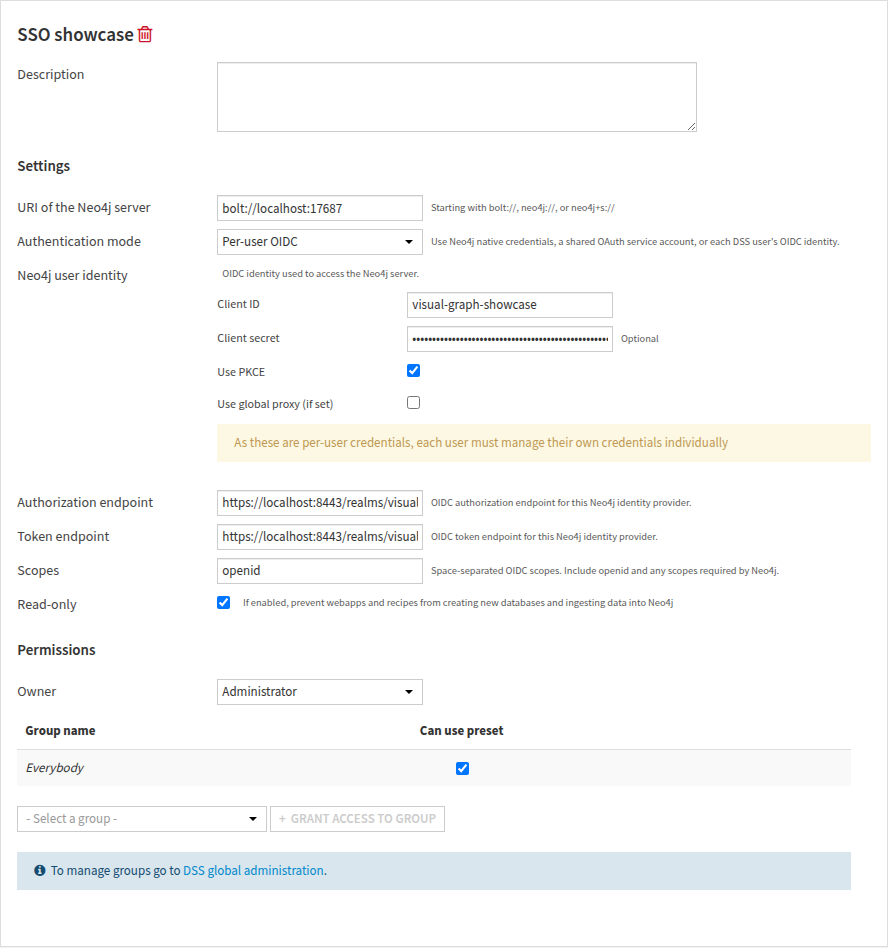
The preset’s URI of the Neo4j server identifies the server. With Authentication mode set to Per-user OIDC, Neo4j user identity defines the OAuth2 client configuration: client ID, optional client secret, authorization endpoint, token endpoint, and scopes.
Scopes must include openid and any additional scopes required by Neo4j. Use PKCE enables Proof Key for Code Exchange when required by the IdP client. See OAuth2 credentials for Dataiku OAuth2 credential settings.
The Editor and Build graph recipe require Read-only to be unchecked and the executing user’s Neo4j identity to have write privileges. The preset is selected in the webapp or recipe settings.
User credentials
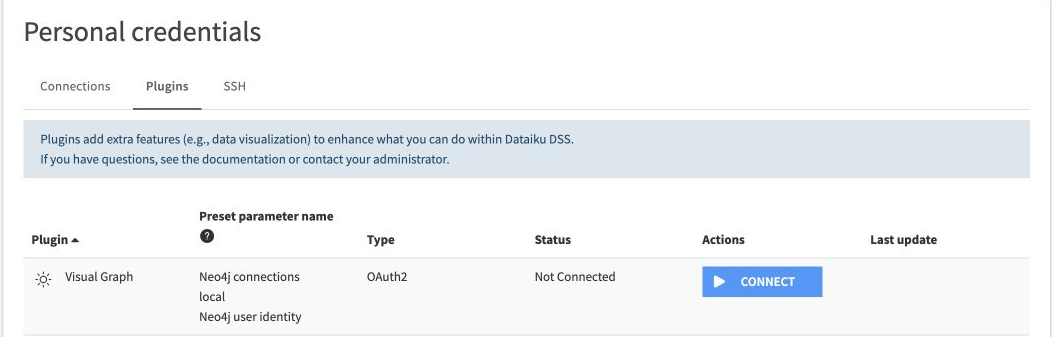
Each user connects their identity under Profile > Credentials > Plugins, using Connect for the preset’s Neo4j user identity. The identity provider handles sign-in; Dataiku stores the resulting credentials.
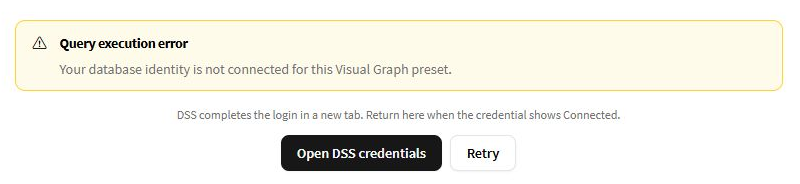
Dataiku renews expired access tokens when a refresh token is available. If credentials are missing, revoked, or cannot be renewed, the user must reconnect from the credentials page. The webapp provides Open DSS credentials and Retry for this case. Retry reloads the webapp, so unsaved query text should be copied first.
Execution identity
With a Per-user OIDC preset:
The Editor and Explorer use the identity of the user accessing the webapp.
Recipes use the identity of the user running the job.
Scenario jobs use the scenario’s Run as user, who must have connected their credentials.
Limitations and sharing
Per-user OIDC is not supported for the Graph Search Agent Tool in Agent Hub.
Warning
Explorer dashboard insights are static snapshots. Viewers see the captured data regardless of their Neo4j permissions. Access to the snapshot is controlled by Dataiku project and dashboard permissions.