Deep Learning On Images
Warning
Starting with DSS version 11, this capability is partially superseded by native computer vision and deep learning in Visual ML.
Use pre-trained image models to classify images, extract deep-learning features, retrain image classifiers on your own labeled data, and create an API endpoint for the resulting classifier.
This capability is provided by the Deep learning on images plugin, which you need to install. Please see Installing plugins.
This capability provides:
An Image classification (v2) recipe to score image folders with a pre-trained classifier
An Images feature extraction (v2) recipe to extract vectors from a selected neural-network layer
A Classification model retrain on images (v2) recipe to fine-tune a classifier on labeled images
A Download pre-trained model (v2) macro to create model folders in your project
A Create Image classification endpoint (v2) macro to create an endpoint for a trained classifier in API Designer
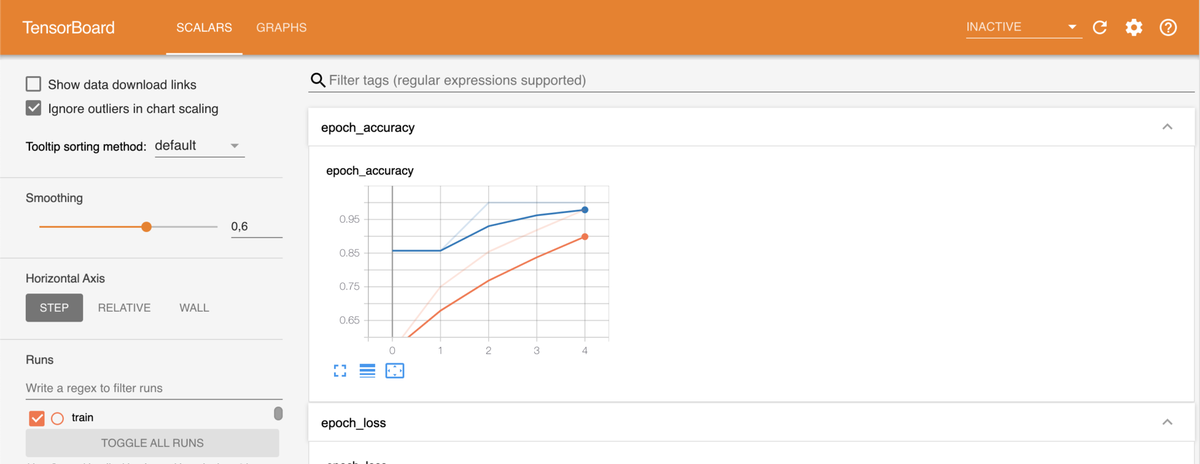
A Tensorboard (v2) webapp to inspect retraining logs
How To Use
The capability works with managed folders for images and models. A common flow is:
Download a pre-trained model with the macro.
Use that model to classify images or extract feature vectors.
Retrain the model on your own labeled images if you need a domain-specific classifier.
Inspect the saved training logs in the TensorBoard webapp after retraining completes.
Create an API endpoint for the resulting model, then deploy the API service to serve predictions.
Image Classification
Use the Image classification (v2) recipe to classify images stored in a managed folder.
Inputs
Image folder: Folder containing the images to score
Model folder: Folder containing a downloaded or previously retrained model
Output
The recipe outputs a dataset containing:
images: Path of each input imageprediction: Predicted labels and associated probabilitieserror: Whether the file could not be processed as an image
Settings
The main classification settings are:
Max number of class labels to keep in the output
Min probability threshold to filter low-confidence labels
When GPUs are available on the DSS execution environment, the recipe also exposes GPU usage settings.
Image Feature Extraction
Use the Images feature extraction (v2) recipe to extract vectors from a selected model layer for downstream machine learning.
Inputs
Image folder: Folder containing the source images
Model folder: Folder containing a downloaded or previously retrained model
Output
The recipe outputs a dataset containing the image path, extracted feature values, and error information for files that could not be processed.
Settings
The main setting is Select extracted layer, which lets you choose which neural-network layer to use for feature extraction.
When GPUs are available on the DSS execution environment, the recipe also exposes GPU usage settings.
Model Retraining
Use the Classification model retrain on images (v2) recipe to adapt a pre-trained classifier to your own labeled images.
Inputs
Label dataset: Dataset containing at least an image filename column with paths relative to the image folder, and a label column
Image folder: Folder containing the training images
Model folder: Folder containing the pre-trained or previously retrained model
Output
The recipe outputs a managed folder containing the retrained model and, when enabled, TensorBoard logs.
Settings
The retraining recipe lets you configure:
Image filename column, Label column, Train ratio, and Random seed for mapping the dataset and splitting it into training and validation sets
Pooling and Image shape (Height | Width), which are fixed when the input model has already been retrained
Layer(s) to retrain: Choose Last layer, All layers, or N last layers, and specify N for the last option
Dropout, L1 regularization, and L2 regularization
Optimizer, Learning rate, and optimizer Custom parameters
Batch size, Number of epochs, Steps per epoch, and Number of validation steps
Use data augmentation, with # augmentation per image and augmentation Custom parameters when enabled
Use TensorBoard to save training logs for the TensorBoard webapp
When GPUs are available on the DSS execution environment, the recipe also exposes GPU usage settings.
Model Download
Use the Download pre-trained model (v2) macro to create a managed folder containing a supported pre-trained image model.
The macro lets you choose:
The output managed folder
The pre-trained model to download
Use a separate folder for each downloaded model so that recipes and macros can reference them cleanly.
API Endpoint Creation
Use the Create Image classification endpoint (v2) macro to create an endpoint for a trained classifier in an API Designer service.
The macro lets you choose:
The model folder to use
The target API service, including the API service ID when creating a new service
The Endpoint unique ID
The output behavior for classification results, including max number of class labels and minimum probability threshold
To serve predictions, deploy the API service after running the macro. See First API (with API Deployer). The endpoint accepts a base64-encoded image through the img_b64 parameter.
TensorBoard Webapp
Use the Tensorboard (v2) webapp to inspect training logs saved in a retrained model folder.
Enable Use TensorBoard in the retraining recipe and run it to completion. The logs are saved to the output model folder when the model is saved.
Create a Tensorboard (v2) webapp and, in its Settings tab, select the output folder in Folder containing retrained model. Only folders containing TensorBoard logs are offered.
Start or restart the webapp to view the logs.