
Building tools that integrate with Agent Hub and Agent Chat
You can build custom tools that can be used by agents within Agent Hub and Agent Chat.
In-chat authentication
When a tool relies on a DSS connection that requires per-user credentials, end users can now be prompted directly in the chat interface to authenticate.
The authentication prompt is only displayed when credentials are actually missing — if the user is already authenticated on the connection, nothing is shown.
This mechanism is supported for tools that call DSS connections using any of the following credential types:
Username/password connections
Single-field / API-key credentials
OAuth redirect credentials
Azure OAuth device-code credentials
Note
In-chat authentication only applies to tools backed by DSS Connections.
Tools that authenticate through other means (e.g., custom code calling external APIs with their own auth) are not covered.
Missing-credentials error
For the in-chat authentication flow to trigger, your tool must surface missing-credential errors so that Agent Hub or Agent Chat can detect them.
Example of an error that will be detected:
DataikuException: com.dataiku.dip.exceptions.DKUSecurityRuntimeException:
User 'admin' does not have credentials for connection 'snowflake-per-user' to access Snowflake
This is the standard message format of DKUSecurityRuntimeException, which DSS raises automatically when a user tries to use a per-user connection they haven’t authenticated against.
In practice, this means your tool should simply let the underlying DSS exception propagate.
Display Sources
If you want your agent data sources or references to be displayed in the “Sources” tab, you must provide this information into the additionalInformation field of their tool calls.
{
   "toolCallDescription": "Revenue Analysis",
   "items": [
      {
      "type": "INFO",
      "textSnippet": "Analyzing sales data for Q3..."
      },
      {
      "type": "GENERATED_SQL_QUERY",
      "performedQuery": "SELECT date, revenue FROM sales WHERE quarter = 'Q3'"
      },
      {
      "type": "RECORDS",
      "records": {
         "columns": ["date", "revenue"],
         "data": [
            ["2023-07-01", 100],
            ["2023-07-02", 120]
                ]
         }
      }
   ]
}
Then you will need to tag each type of item used.
Tag to Use |
Display Text in “Sources” Tab |
|---|---|
|
Document |
|
Document |
|
Records |
|
Generated SQL Query |
|
Code Snippet |
|
Image |
|
Info |
Note
If you send a custom string (e.g., API_RESPONSE), the UI will display the raw string “API_RESPONSE” instead of a polished label.
Rendering of charts
If you want your tool to return data that can be used to generate charts in the chat interface, you must return an artifact of type RECORDS.
{
   def _create_record_payload(df):
   return {
      "type": "RECORDS",  # Critical: tells UI to treat this as chartable data
      "records": {
            "columns": df.columns.to_list(),  # List of string headers
            "data": df.values.tolist()        # List of lists (rows)
      }
   }
}
Rendering of graphs
Agent Hub and Agent Chat can render an interactive node-and-edge graph inline in the chat, whenever a tool returns an artifact of type GRAPH.
The simplest way to get this is by equiping your agent with the Graph Search agent tool, which translates the user’s question into a Cypher query and returns the matching nodes and edges as a GRAPH artifact.
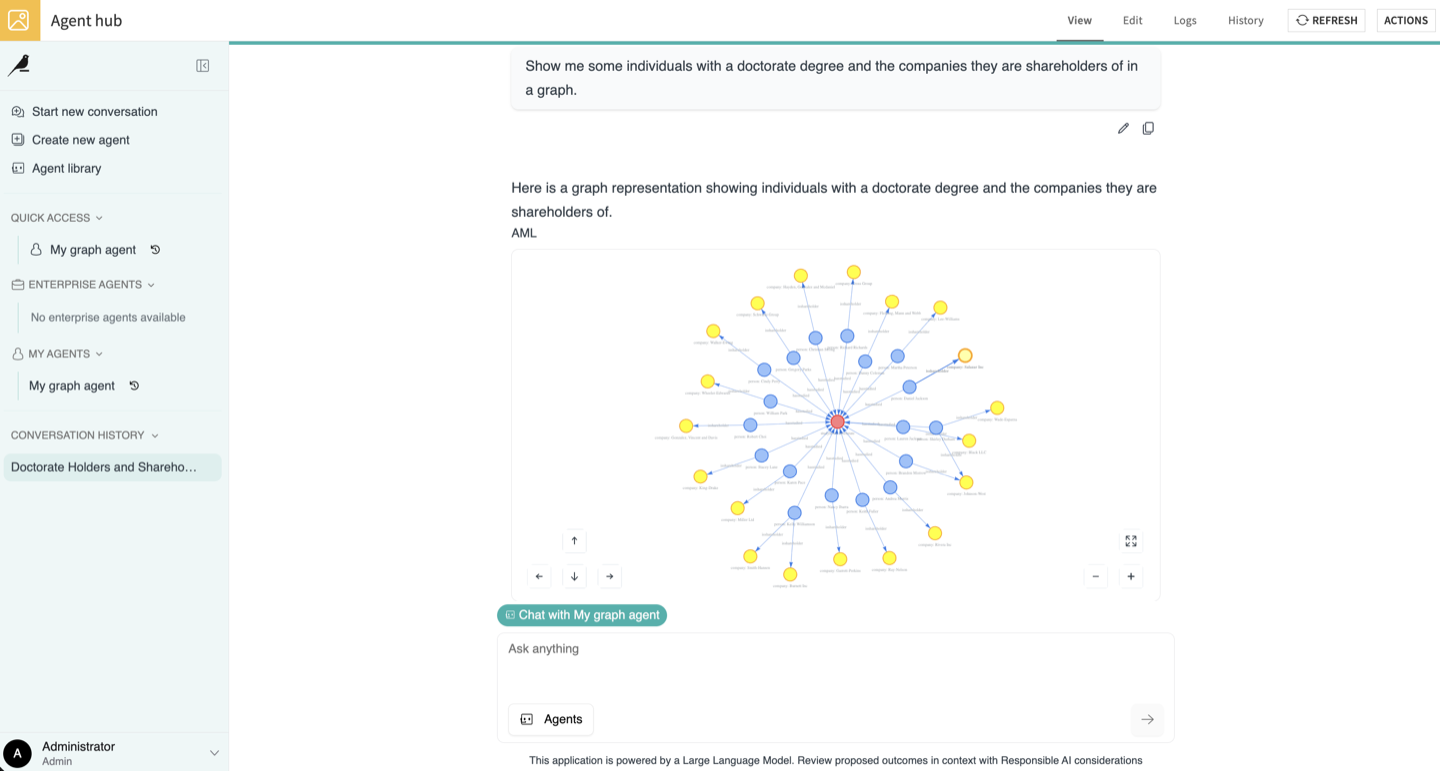
For custom tools, return a GRAPH artifact in the artifacts list of your tool’s response.
The topology lives under customData.graph:
def _create_graph_payload(graph_name, nodes, edges):
    return {
        "type": "GRAPH",
        "name": graph_name,
        "description": "Nodes and edges used by the query",
        "parts": [
            {
                "type": "GRAPH",  # Critical: tells the UI to draw this as a graph
                "customData": {
                    "graph": {
                        "schema_version": 1,
                        "graph_name": graph_name,
                        "nodes": [
                            {
                                "id": n["id"],              # Unique, referenced by edges
                                "label": n["label"],        # Displayed on the node
                                "group_id": n["group_id"],  # Node type, drives colouring
                                "group_name": n["group_name"],
                                "properties": n.get("properties", {}),
                            }
                            for n in nodes
                        ],
                        "edges": [
                            {
                                "id": e["id"],
                                "src": e["src"],            # Must match a node id
                                "dst": e["dst"],            # Must match a node id
                                "group_id": e["group_id"],  # Relationship type
                                "group_name": e["group_name"],
                                "properties": e.get("properties", {}),
                            }
                            for e in edges
                        ],
                    }
                },
            }
        ],
    }
Downloadable Files
To make files generated by your tool downloadable in-chat and include them in the Downloads tab, you can return artifacts from your tool’s output payload.
Two methods are supported for generating downloadable files: Tabular Records and Inline Data.
Tabular Records
If your tool returns an artifact of type RECORDS.
If a single table is returned, the UI will automatically generate and provide a
.csvfile for download.If multiple tables are returned, they will be automatically zipped into a single
.zipfile.
Inline Data
For any other file types (such as PDFs, XLS, DOCX, PPTX…) you can return an artifact containing a DATA_INLINE part.
When returning a DATA_INLINE artifact, the following fields are populated in the Downloads tab:
name: Title displayed on the download card. It’s recommended to include the file extension in the name.mimeType: File format displayed and associated subtext label.dataBase64: The actual base64-encoded string of the file’s binary content.
Example Artifact Payload:
"artifacts": [
   {
      "name": "Q3_Financial_Summary.pdf",
      "parts": [
            {
               "type": "DATA_INLINE",
               "mimeType": "application/pdf",
               "dataBase64": "JVBERi0xLjQKMSAw..."
            }
      ]
   }
]
Human in the Loop
All native and custom tools in DSS can enforce user validation before being executed. This is defined in the tool Settings > Human approval.
When this is set up, users will receive in-chat a prompt to approve or reject the tool call, and optionally edit its parameters.
This mechanism allows users to interactively review, modify, and approve tool parameters generated by an LLM, within Agent Hub or Agent Chat. This gives access to an interactive form directly inside the chat window.

The form is rendered from the tool’s inputSchema: each JSON Schema type maps to an input widget, and nested objects are rendered as grouped sections.
def get_descriptor(self, tool):
    return {
        "name": "configure_delivery",
        "description": "Configures delivery options. Requires HITL approval.",
        "inputSchema": {
            "type": "object",
            "properties": {
                "settings": {
                    "type": "object",
                    "description": "Rendered as a grouped section.",
                    "properties": {
                        "reference": {
                            "type": "string",
                            "description": "Free-text input."
                        },
                        "priority": {
                            "type": "string",
                            "enum": ["Low", "Standard", "High"],
                            "description": "Single-select dropdown."
                        },
                        "budget": {
                            "type": "number",
                            "description": "Numeric input."
                        },
                        "regions": {
                            "type": "array",
                            "items": {
                                "type": "string",
                                "enum": ["EMEA", "AMER", "APAC"]
                            },
                            "description": "Multi-select dropdown."
                        },
                        "notify": {
                            "type": "boolean",
                            "description": "Toggle."
                        }
                    },
                    "required": ["reference", "priority"]
                }
            }
        }
    }
Fields listed in required must be filled before the user can approve the call.