
Testing Semantic Models
After building a Semantic Model, its accuracy on real business questions needs to be verified before it is exposed broadly.
The Testing tab of the Semantic Model editor lets builders define a set of questions with their expected SQL and/or expected answer, run them against a Semantic Model version, an LLM and a set of accuracy methods, and inspect the resulting cost, latency and accuracy.
Requirements
Dataiku 15.1+
Semantic Models Lab plugin 1.3+
Settings
Testing settings are configured in the Semantic Model editor’s Settings tab.
Before running a test, a managed folder must be created in the project hosting the Semantic Model and selected as the Storage.
A diagnosis LLM can optionally be selected, used to generate a diagnosis for questions that fail or partially pass a test run.
Accuracy method settings (e.g. thresholds) are also configured there, with default values prefilled.
Prompt sets
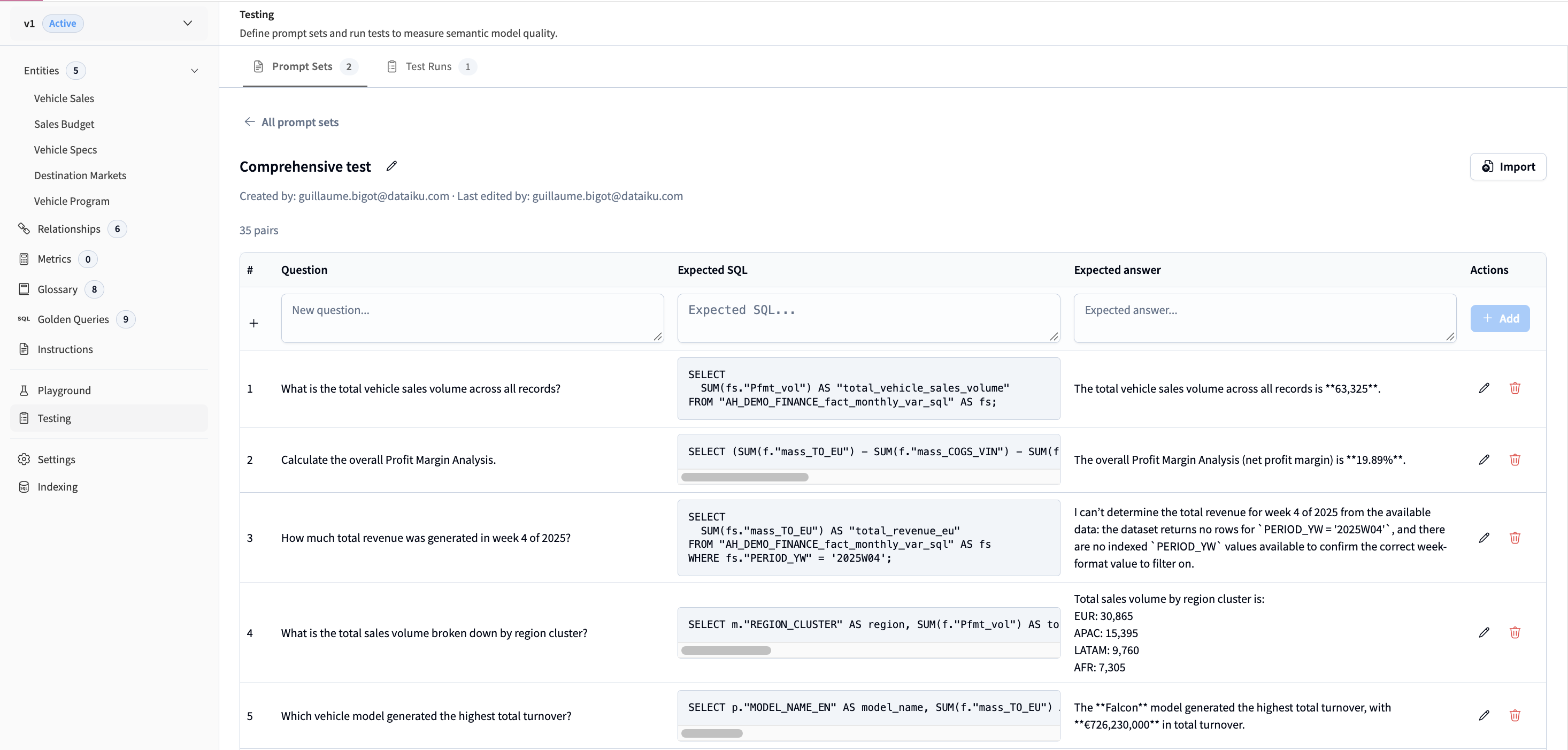
A prompt set is a collection of pairs, each made of a question, an expected SQL query and/or an expected natural language answer.
Prompt sets can be imported from a DSS dataset or a CSV file. The dataset used to evaluate an agent built on the Semantic Model in Agent Review can typically be reused here.
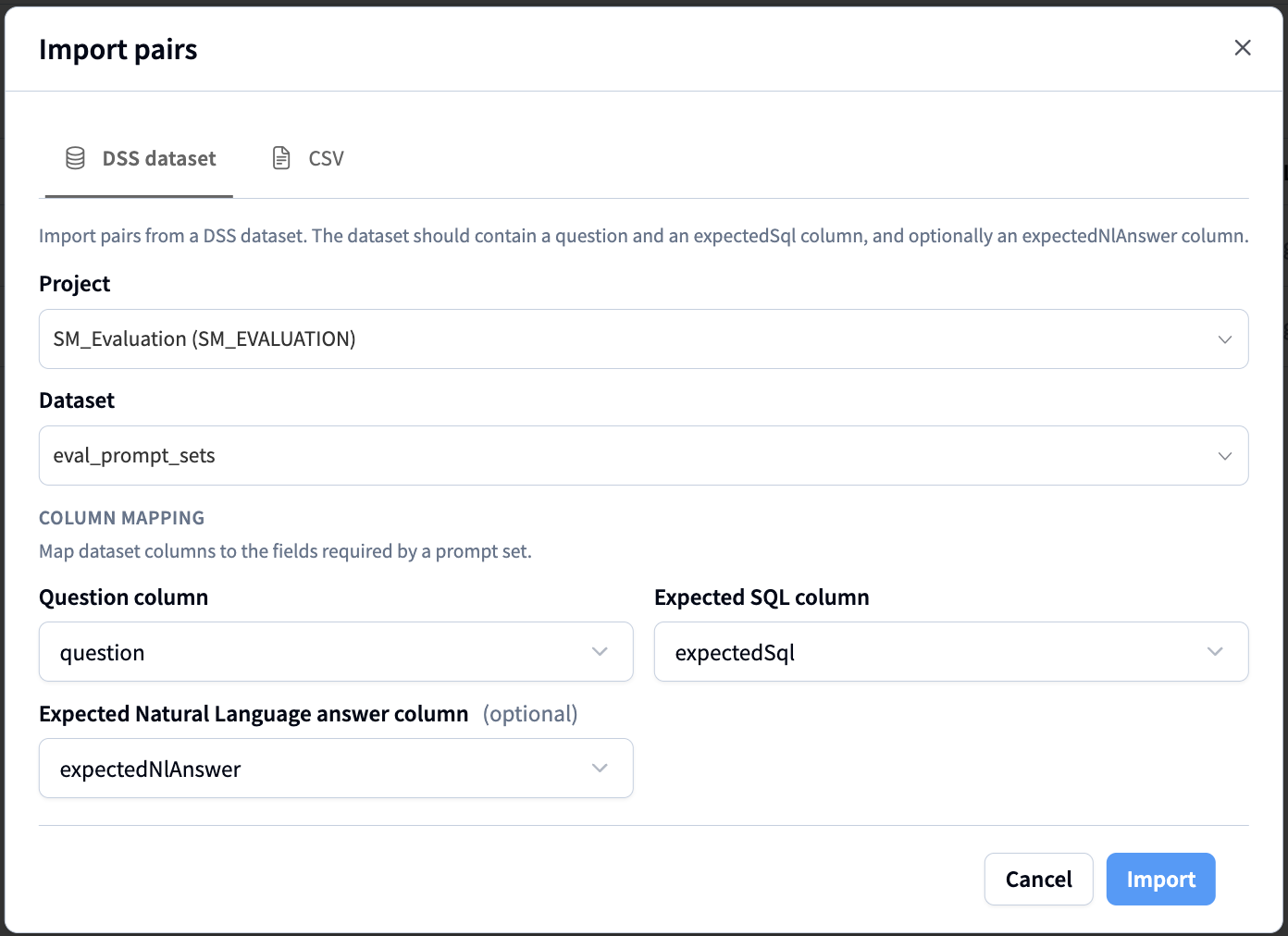
Once created, pairs can be edited, deleted, or added manually. New pairs can also be imported from a DSS dataset or CSV, either appended to the existing pairs or replacing them.
Test runs
A test run evaluates a Semantic Model against a prompt set. Creating one requires selecting a prompt set, a Semantic Model version, the Semantic Model Query Tool settings (notably its LLM) and the accuracy methods to apply.
Running a test generates a SQL query for each question and evaluates it with the selected accuracy methods, processing questions in batches of five. Launching a test run creates a scenario in the project.
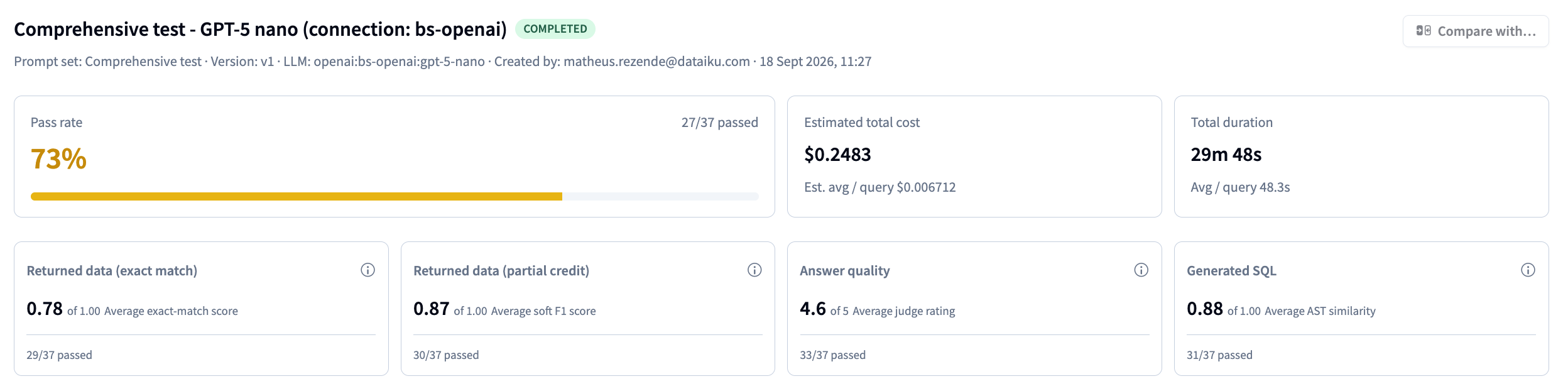
A test run reports, at the run level:
The pass rate: the share of pairs that pass every selected accuracy method. Reaching 100% is not required before deploying a Semantic Model to automation node.
The estimated cost and duration of the Semantic Model Query Tool calls, both in total and on average per question. These reflect the tool’s own cost and latency, not the cost or duration of the run itself.
The average score of each enabled accuracy method, and how many pairs pass it (i.e. score above the configured threshold).
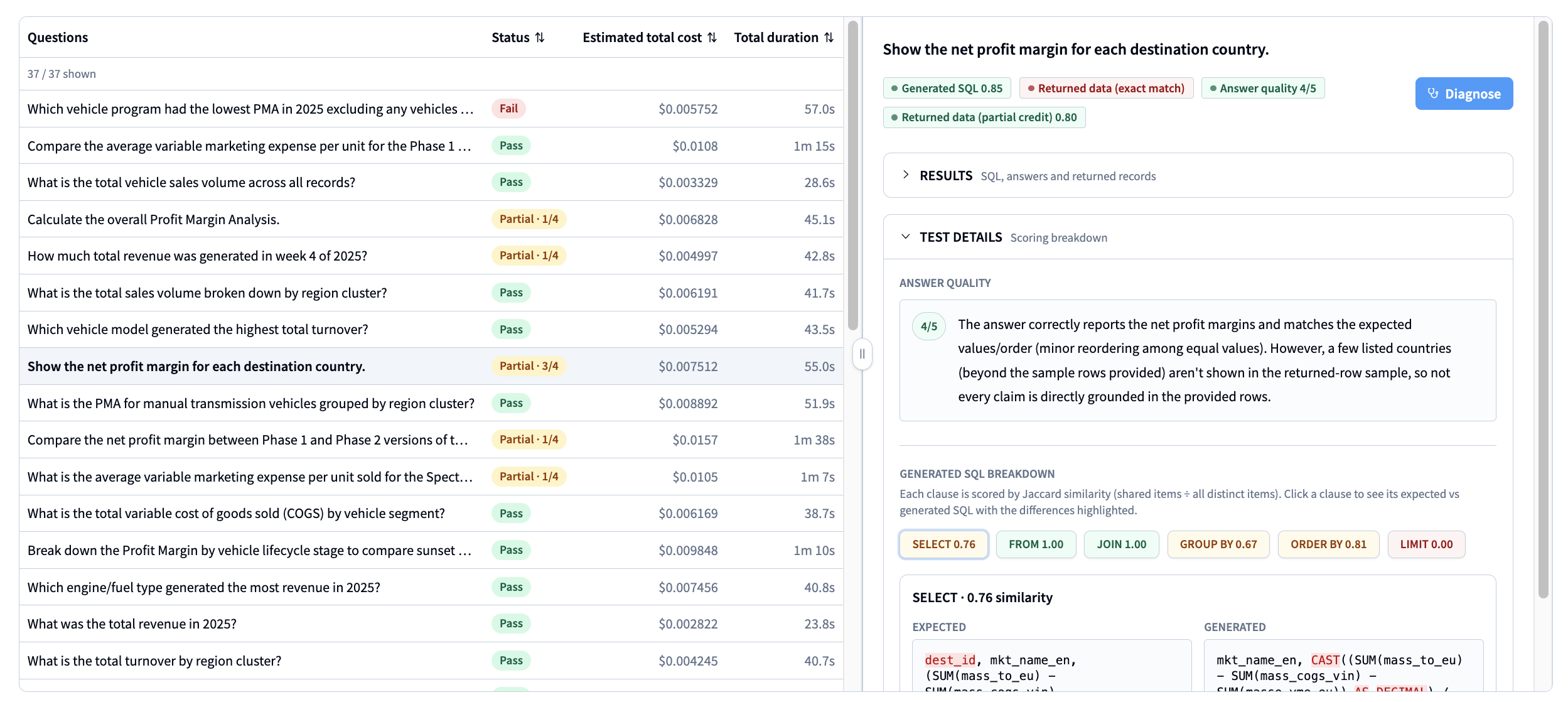
For each question, the run also reports:
Its status (Fail, Pass or Partial) and the cost and duration of the tool call.
A breakdown of the accuracy methods’ outputs, including the expected and generated SQL, the expected and generated answer, and a sample of the generated records.
If the “Answer quality” method is enabled, the output and score of the LLM-as-a-judge evaluation.
If the “Generated SQL” method is enabled, the score for each SQL clause and the differences between the generated and expected SQL.
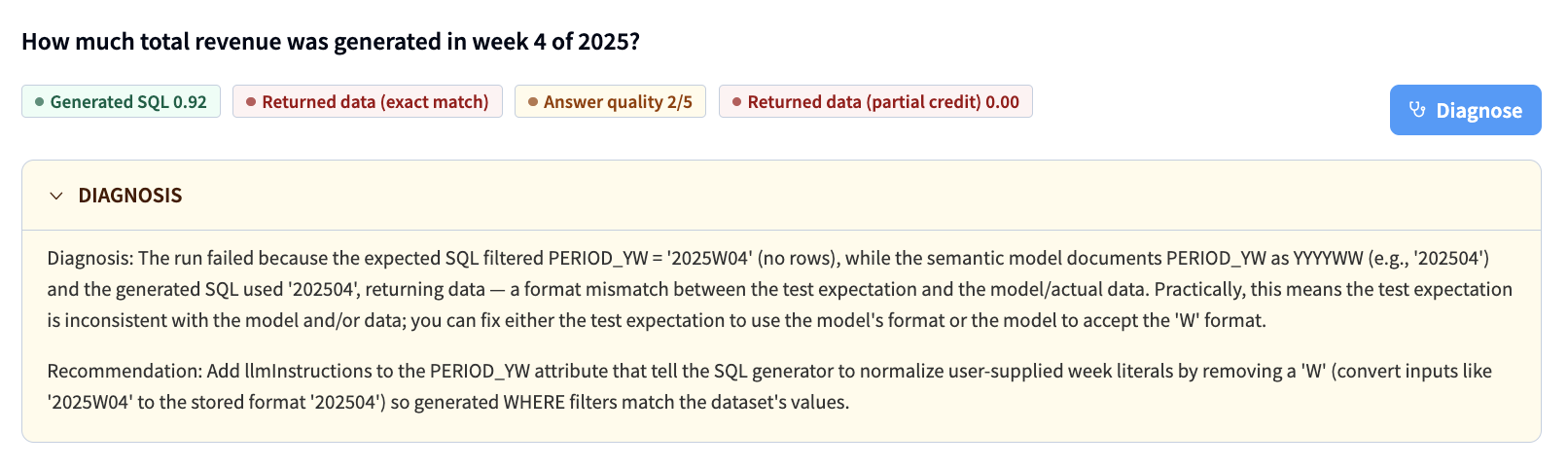
A Diagnose action for Partial or Failed questions, which generates an LLM diagnosis of the likely cause and recommendations for updating the Semantic Model.
Comparing runs
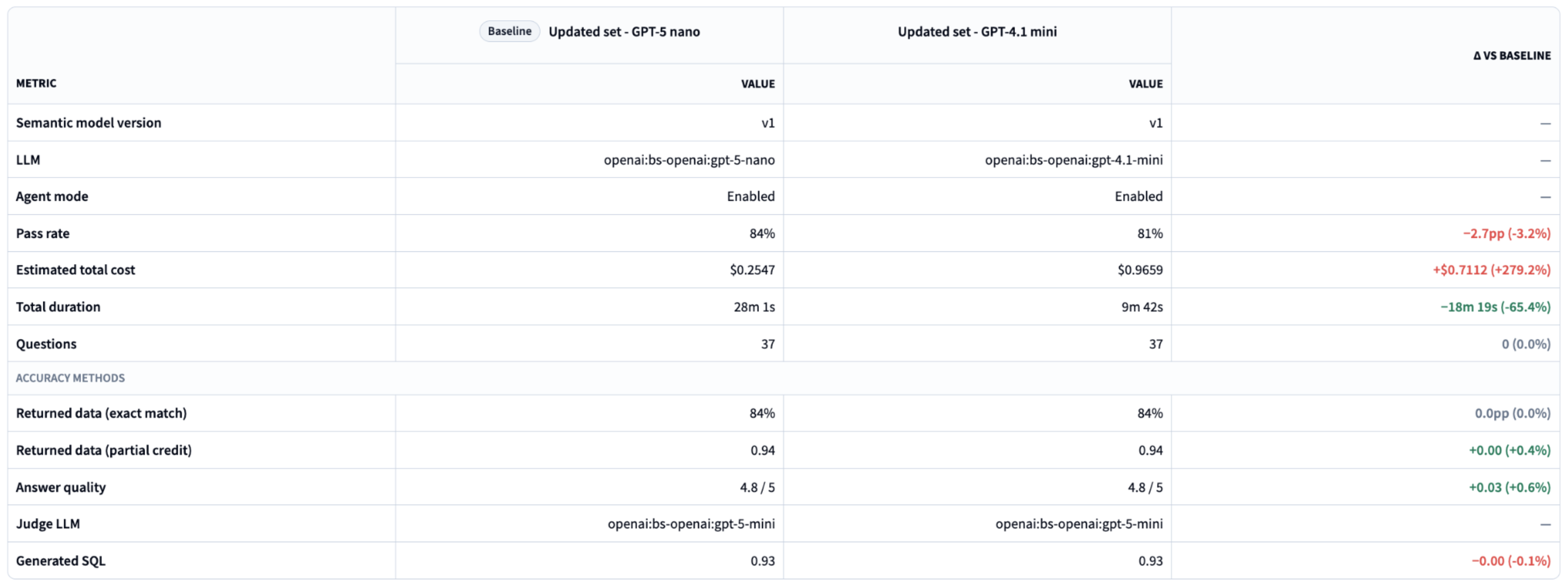
Running the same prompt set against different Semantic Model versions or LLMs, and comparing the resulting runs, shows how a change to the Semantic Model or a choice of LLM affects accuracy, cost and latency.
Accuracy methods
Returned data - exact match
Also known as execution accuracy. The expected and generated SQL are both executed against the connection, and their result sets are compared as sets of rows, ignoring row order. A query that errors or times out scores 0.
The output is binary per pair (1 if the row sets match exactly, 0 otherwise), with a reason such as match, row-set mismatch, or the database error message.
Returned data - partial credit
Also known as soft F1 score. This is a more tolerant counterpart to exact match, distinguishing “almost right” from “completely wrong”.
Both queries are executed and their results turned into a bag of items, either at cell or row granularity, then compared as multisets to compute precision, recall and F1 score.
Cell granularity flattens every value across rows and columns into a single bag, so a row that is mostly right still earns credit for its correct values. Use it for value retrieval over wide tables where some tolerance is acceptable.
Row granularity treats each full row as one item, so a single wrong value invalidates the whole row. Use it when the relationship between columns matters, such as financial reporting or key-value lookups.
Generated SQL - AST scoring
This evaluates the logic of the generated query rather than the data it returns. Both queries are parsed into abstract syntax trees, identifiers are normalized for the dialect and table aliases are partly stripped, so only structural intent is compared. Each query is then broken into clause groups (SELECT, FROM, JOIN, WHERE, GROUP BY, ORDER, LIMIT), and each clause is scored on how much its components overlap between the expected and generated query.
A perfect structural score shows the query was written as intended, but not that it returns the same rows as the expected query.
Answer quality - LLM as a judge
This is the only method that evaluates the natural language answer returned to the business user, rather than the SQL behind it.
A judge LLM is given the question, the expected and generated SQL, the expected and generated answers, and a sample of the returned rows. It scores the generated answer on two dimensions: semantic equivalence (it conveys the same facts as the expected answer) and groundedness (its claims are supported by the returned data rather than invented).
The judge LLM, parameters passed to the judge LLM and its prompt can be customized in the Settings tab.
Choosing accuracy methods
Method |
What’s evaluated |
Relative cost |
When to choose it |
|---|---|---|---|
Returned data, exact match |
Records |
Medium (executes every query) |
Outputs must be strictly accurate. |
Returned data, partial credit |
Records |
Medium (executes every query) |
Partial credit for data overlap is acceptable, robust to row ordering. Use row granularity when column relationships matter, cell granularity for wide tables with acceptable error tolerance. |
Generated SQL |
Generated SQL |
Lowest (no query execution) |
Validating code logic, syntax and clause structure without running queries against a live database. |
Answer quality |
Natural language answer |
Medium (one LLM call per pair) |
Evaluating the human-facing response, including groundedness in the retrieved records. Requires less setup, since no expected SQL is needed. |
Notes
Semantic Model testing is meant for use while building and iterating on a Semantic Model, not for monitoring Semantic Models already in production.
It is complementary to evaluating an agent that calls the Semantic Model with Agent Review: the same prompt set can be reused in Agent Review, though the agent’s answers may differ since the agent can call other tools that give it access to extra context.