
Speech Recognition
Speech recognition is the process of transforming audio files into text.
This capability is provided by the “Speech Recognition” plugin, which you need to install. Please see Installing plugins.
The Speech Recognition recipe leverages Whisper to perform speech-to-text.
How to use
After installing the plugin:
In the Flow, click + Recipe.
In Natural Language Processing, select Speech Recognition.
Select an input managed folder and an output dataset.
Configure the language and Whisper model size, then run the recipe.
Inputs
The recipe takes one input:
Audio files: a managed folder containing audio files.
Only .wav files are processed. If no .wav file is found, the recipe fails.
Parameters
Language
Choose the language used for transcription. The plugin exposes a large set of languages supported by Whisper.
The default is en (English).
Whisper model size
You can choose among:
tiny(~1 GB required VRAM)base(~1 GB required VRAM)small(~2 GB required VRAM, default)medium(~5 GB required VRAM)turbo(~6 GB required VRAM)large(~10 GB required VRAM)
Outputs
The recipe writes one output dataset with the following columns:
path: path of the audio file in the input managed foldertext: transcribed textcomment: error message when transcription fails for a file
Transcription errors are handled per file: failed files get a comment value, while other files are still processed.
Offline model loading
In restricted or air-gapped environments, a DSS administrator can preload Whisper assets in the plugin code env resources so the recipe runs without downloading files at runtime.
Recommended setup:
Download the required Whisper model file(s) (
.pt) on a machine with internet access. Model URLs are listed in the Whisper repository (line 17): https://github.com/openai/whisper/blob/v20250625/whisper/__init__.py.Create a zip archive containing the
.ptfiles.Open the plugin code environment settings.
If you plan on using containerized execution, in Containerized execution set Resources initialization to Copy resources from local code environment.
In Resources, upload the zip archive and make sure files are available directly under the
speechrecognition-packagefolder.
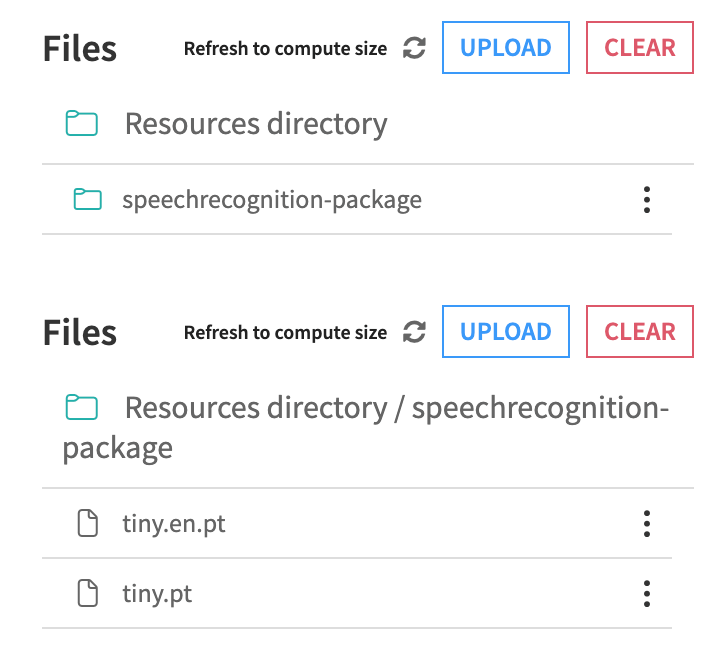
Rebuild the code environment.
At runtime, models are expected under the folder speechrecognition-package.
If the selected model is not available locally, the recipe will try to fetch it.
Migration from Speech-to-Text
The plugin includes two maintenance runnables to replace deprecated speech-to-text CPU/GPU recipes:
Replace deprecated Speech-to-Text recipes (current project)
Replace deprecated Speech-to-Text recipes (all projects)
During replacement, the new recipe type is applied, the old weights input role is removed, and existing recipe outputs are preserved.
Both runnables provide an option to delete the old weights managed folder when it is no longer needed by the migrated recipe.