
Key concepts
The below key concepts will help you efficiently design Structured Visual Agents.
Blocks
The basic component of a Structured Visual Agent is the Block. The Agent’s control flow moves between blocks, which are linked in a graph.
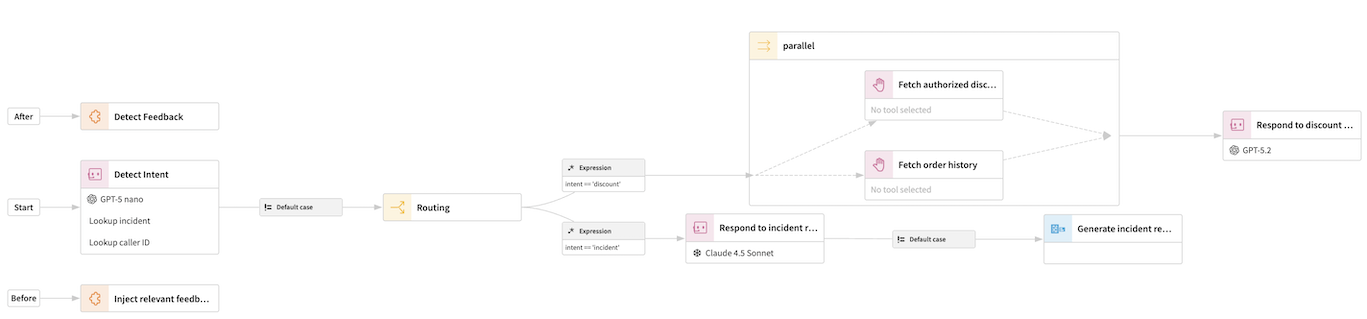
Most blocks have a single “next block” field, which indicates which block executes after it. Some blocks, such as the “Routing” block, can use conditional logic to branch to multiple outputs.
Other blocks can “nest” sequences of blocks. For example the “Parallel” block executes in parallel several sequences of blocks, until each sub-sequence is completed.
For more details, please see Blocks.
State and Scratchpad
A key feature of Structured Visual Agents is the ability to remember information between blocks, and between turns (i.e. when the conversation goes back to the user).
For that, they use two objects, the State and the Scratchpad:
State is a persistent conversation-scope memory. It persists between blocks, but also across turns. For example, an agent acting as a Customer Support Representative will probably lookup information about the Customer as one of its first steps, and then store it in the State, so that it can then refer to it. The State persists across turns, so that the Agent does not need to look it up afterwards
Scratchpad is a very short term memory. It only remembers information across a single sequence of blocks, and is not kept across turns. It can be used to remember heavy information that is not worth remembering across turns. The Scratchpad is also key when using “nested” blocks. For example, the “for each” block runs a sequence of blocks several times (by iterating on a list of tasks / things to check). The nested block sequence will thus execute several times, possibly in parallel. Thus, if it wrote to the global State, it would overwrite its own work each time. Instead, each iteration of the “for each” loop gets its own scratchpad, and can work directly with it, knowing that there is no risk of conflict with other iterations.
The state and scratchpad are dictionaries of key-values.
The state and the scratchpad can be written either:
Through explicit dedicated blocks (“Set state entries” and “Set scratchpad entries”)
Through Custom Python blocks
Through “virtual tools” that can be given to the Agent, where the LLM will decide to read or write things in the state/scratchpad based on instructions
The state and the scratchpad can be read:
In the Set state entries / Set scratchpad entries block
Through Custom Python blocks
Through “virtual tools” that can be given to the Agent, where the LLM will decide to read or write things in the state/scratchpad based on instructions
Through expansion in various prompt / instructions fields (see below)
Expressions and templating
A key concept that makes Structured Visual Agents powerful is their ability to pass and use structured information between blocks. This is done notably through Expressions and Templating
For example, if the state has been filled with two keys, customer_lifetime_value and average_discount_rate, you can create a new state key indicating the discounted value using expression state.customer_lifetime_value * state.average_discount_rate. This is an expression.
In virtually all locations in Structured Visual Agents where you can enter text, you can use templating to replace parts of the text with references to expressions.
For example, you can write an agent prompt like below, to dynamically inject context into the prompt.
You are working for a customer whose first name is {{ state.customer_first_name }}.
Make sure to address them using their first name.
For more details, please see Expressions and templates
Starting block and subsequent turn behavior
Each Structured Visual Agent has a single “Starting Block”, which is where a new conversation starts. While executing, control flow moves from block to block, until there is no “next block”. When this happens, the turn finishes.
If the Agent is used in conversational mode (through a Chat UI, for example), the Agent must decide what to do on subsequent turns.
The key options are:
Go to the starting block
Resume at the last block of the previous turn
Some blocks are inherently “restartable”, i.e. it makes sense to restart the next turn on this block, because it can do something new. This is the case, in particular, of the “Agentic Loop” block, which implements the core Agentic/Tool-Calling loop. When restarted, the conversation with the LLM simply continues.
However, for some blocks, it does not make sense to restart on them. For example, if the last block of a turn was a “Generate Report” block that generated a PDF report of the conversation, trying to restart on this block would simply generate the same report. It means that in that case, you probably don’t want to restart at the last block of the previous turn.
Thus, restarting at the last block only truly makes sense if the previous turn ended on a restartable block.
Restarting at the last block has the advantage of being very easy, but can also create situations where your agent can become “locked in to a topic”. For example, if your Agent uses a Routing block to dispatch based on the detected intent, if the user tries to change topics during a conversation, it can be difficult to “go back”.
On the other hand, restarting from the starting block at each turn means that you need to implement a full logic at the beginning of your sequence to “go-to” the proper block if needed. For example, if your agent starts by fetching customer information, you’ll need to implement as a first block a routing block that checks “do I already have the customer information in the state”, in order to skip the information retrieval on subsequent turns.
To help with this choice, Structured Visual Agents also implement a Smart mode for next-turn behavior, which uses a LLM to detect whether it’s better to restart at the beginning or at the last block, notably by detecting if the user’s intent has changed.
Pre-turn and post-turn blocks
There are many cases where you want to always perform actions at the start of a turn, or at the end of the turn, regardless of the main control flow.
Some examples include:
Gather facts from long-term memory at the start of each turn
Checking custom permissions at the start of each turn
Call Guardrails at the end of each turn
Detect if the user gave negative feedback at the end of each turn
Implementing these in the main control flow could become too complex. Thus, Structured Visual Agents implement a “pre-turn” and “post-turn” sequence of blocks, that are guaranteed to always execute.