
Data Management concepts
When you want to define KPIs that use data that does not exclusively come from Agent Logs, you will need to manage data using the underlying Dataiku Platform for AI Success.
This section introduces the main concepts for data management and analysis in the data part of Agent Management.
Data
Dataiku Agent Management allows you to work with data that is structured or unstructured.
Structured data is a series of records with the same schema. In Dataiku Agent Management, such data is referred to as a dataset.
Unstructured data can have an internal structure, but the entries do not necessarily have the same schema. Examples of unstructured data are images, video, audio, and so forth.
Datasets
The dataset is the core object you will be manipulating. It is analogous to a SQL table, as it consists of a series of records with the same schema.
Agent Management supports various kinds of datasets. For example :
A SQL table or custom SQL query
A collection in MongoDB
A folder with data files on your server
Recipes
Recipes are the building blocks of your data applications. Each time you make a transformation, an aggregation, a join, … with Agent Management, you will be creating a recipe.
Recipes have input datasets and output datasets, and they indicate how to create the output datasets from the input datasets.
Agent Management supports various kind of recipes :
Executing a data preparation script defined visually within the Studio
Executing a SQL query
Executing a Python script (with or without the use of the Pandas library)
Executing a Hive query
Synchronizing the content of input to output datasets
Building datasets
Recipes and datasets together create the graph of the relationships between the datasets and how to build them. This graph is called the Flow. It is used by the dependencies management engine to automatically keep your output datasets up to date each time your input datasets or recipes are modified.
Managed and external datasets
Agent Management reads data from the outside world in “external” datasets. On the other hand, when you use the Agent Management to create new datasets from recipes, these new datasets are “managed” datasets. This means that Agent Management “takes ownership” of these output datasets. For example, if the managed dataset is a SQL dataset, Agent Management will be able to drop / create the table, change its schema, …
Managed datasets are created by Agent Management in “managed connections”, which act as data stores. Managed datasets can be created:
On the filesystem of the Agent Management server
On Hadoop HDFS
In a SQL database
On Amazon S3
…
Partitioning
Note
Partitioning is not available in Agent Management Community Edition
Partitioning refers to the splitting of the dataset along meaningful dimensions. Each partition contains a subset of the dataset.
For example, a dataset representing a database of customers could be partitioned by country.
There are two kinds of partitioning dimensions :
“Discrete” partitioning dimension. The dimension has a small number of values. For example : country, business unit
“Time” partitioning dimension. The dataset is divided in fixed periods of time (year, month, day or hour). Time partitioning is the most common pattern when dealing with log files.
A dataset can be partitioned by more than one dimension. For example, a dataset of web logs could be partitioned by day and by the server which generated the log line.
Whenever possible, the Agent Management uses underlying native mechanisms of the dataset backend for partitioning. For example, if a SQL dataset is hosted on a RDBMS engine which natively supports partitioning, Agent Management will map the partitioning of the dataset to the SQL partitions.
Partitioning serves several purposes in Agent Management.
Incrementality
Partitions are the unit of computation and incrementality. When a dataset is partitioned, you don’t build the full dataset, but instead you build it partition by partition.
Partitions are fully recomputed. When we build partition X of a dataset, the previous data for this partition is removed and is replaced by the output of the recipe that generated the dataset. Recomputing a partition of a dataset is idempotent : computing it several times won’t create duplicate records.
This is especially important when processing times series data. If you have a day-partitioned log dataset as input, and a day-partitioned enriched log dataset as output, you want to build the partition X of the output dataset each day.
Partition-level dependencies
Partitioning a dataset allows you to have partition-level dependencies management. Instead of just having the recipe specify that an output dataset depends on an input dataset, you can define what partitions of the input are required to compute a given partition of the output.
Let’s look at an example:
The “logs” dataset is partitioned by day. Each day, an upstream system adds a new partition with the logs of the day.
The “enriched logs” dataset is also partitioned by day. Each day, we need to compute the enriched logs using the “same” partition of the logs.
The “sliding report” dataset is also partitioned by day. Each day, we want to compute a report using data of the 7 previous days.
To achieve that, we will declare: An “equals” dependency between “logs” and “enriched logs” A “sliding days” dependency between “enriched logs” and “sliding report”.
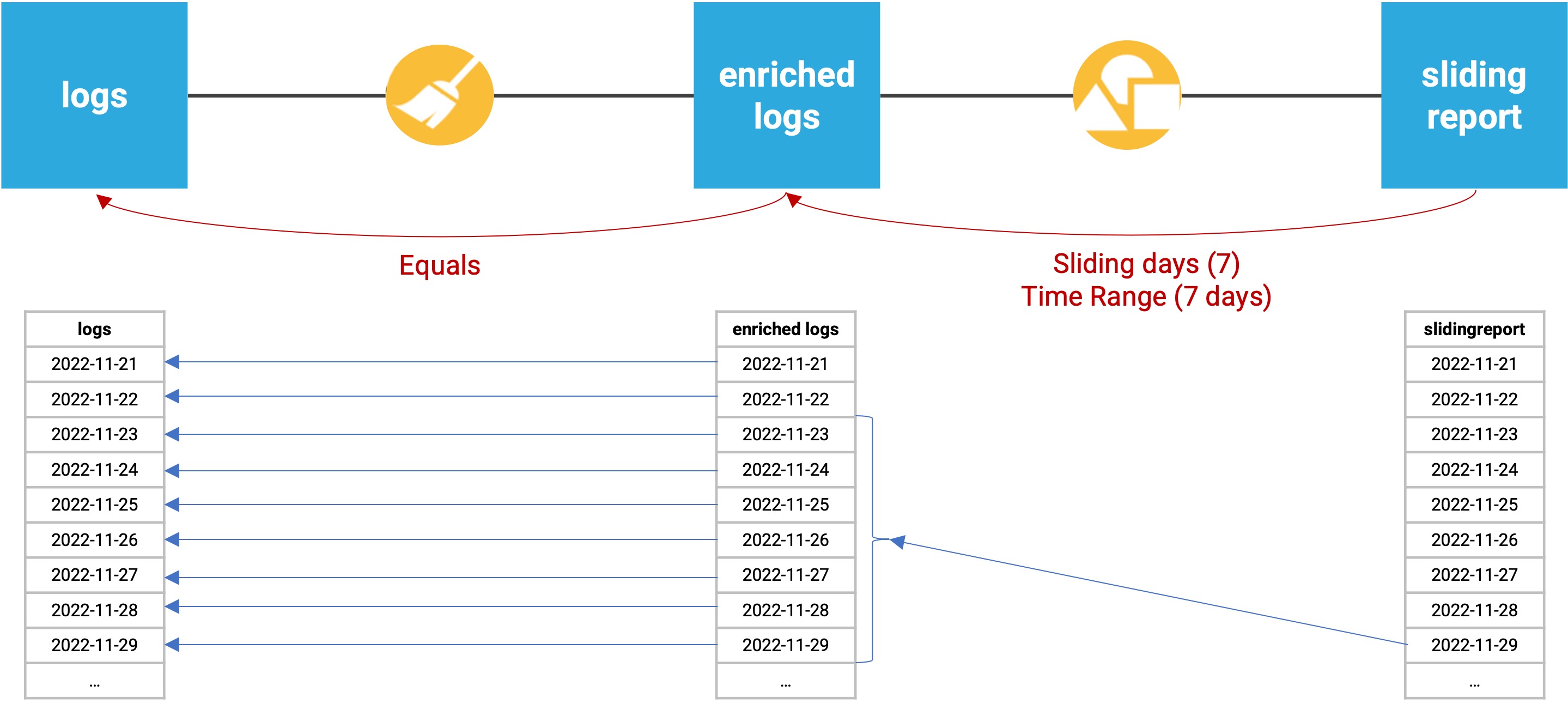
If we ran the above flow for the November 29th partition:
The “enriched logs” dataset would be built directly from the November 29th partition of the “logs” dataset, since it is using an equals dependency function.
The “sliding report” dataset would be built from the November 23rd through November 29th partitions of the “enriched logs” dataset, since it is using a 7 day time range.
Agent Management will then check which partitions are available and up-to-date, and automatically compute all missing partitions. Agent Management will automatically parallelize the computation of enriched logs for each missing day, and then compute the sliding report.
Performance
Generally speaking, when a dataset is partitioned, it can improve querying performance on this dataset. This is especially true for file-based datasets where only the files corresponding to the partition will be read.