
Create, import and manage Semantic Models
The Semantic Model editor is provided by the Semantic Models Lab plugin, which must be installed from the plugin store by an administrator
Creating a Semantic Model
Semantic Models are created within any Dataiku project in the Generative AI tab > Semantic Models.
It is a best practice to build semantic models on top of golden datasets.
Semantic models have a name and versions (one of which is active).
Entities
Entities are tables linked to business concepts and filters.
They are characterized by:
A dataset from a specific project
A name and a description
A primary key
Attributes
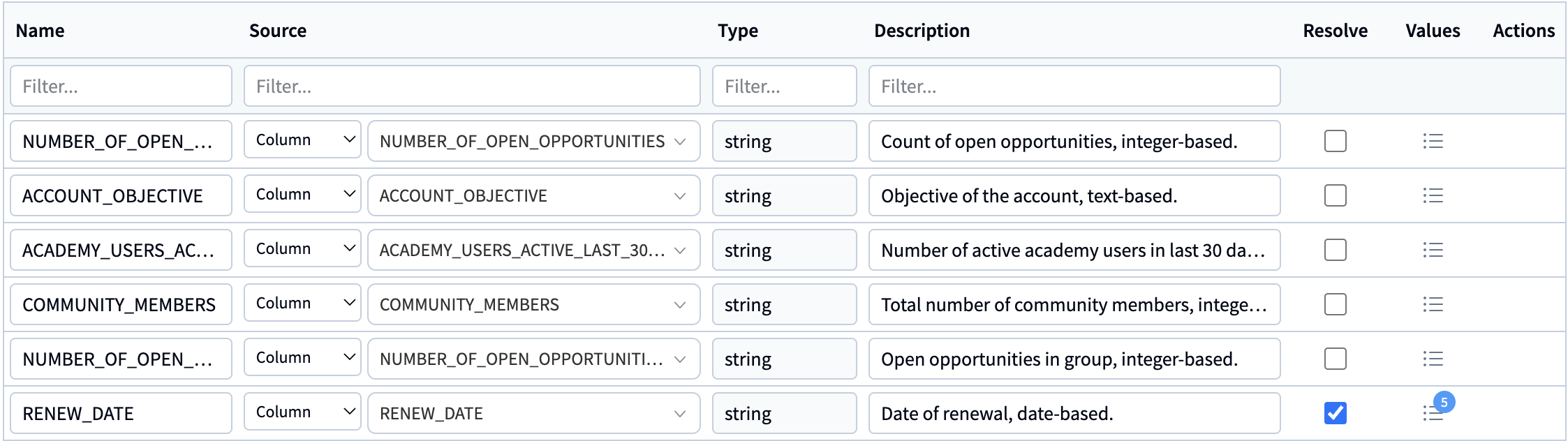
These are mapped to columns from the dataset, come with a SQL expression (usually the column name), a type and a description
Writing custom SQL expressions for attributes is useful when the raw data in your database isn’t in the exact format you need for your semantic model.
Attributes can be resolvable and have sample values
Resolvable attributes are used in a term resolution step, where the user query terms are matched to values from these attributes to account for typo corrections or schema errors
For each attribute, you can add a number of sample values (either by automatically fetching them or adding them manually)
Metrics
Business metrics are aggregations of attributes, used as a standardized way to define KPIs.
They come with a name, a formal SQL expression, a description and LLM instructions.

Filters
They can be used to define filters applied to columns
They come with a name, a formal SQL expression, a description and LLM instructions.

Entities can either be added manually or automatically generated using an LLM.
When using an LLM to automatically generate entities, you can specify instructions (e.g. to provide the number of entities to create from the dataset selected, how to group attributes, information on filters/metrics to create or relationships between these entities).
Automatically generating an entity takes you 80% of the way, you still need to verify and test the entity before exposing it to end-users.
Relationships
Relationships between entities define which keys to use to join two entities. These can both be simple and complex joins.
Metrics
Metrics are aggregations of attributes that can come from multiple entities.
These make it easier to define indicators such as revenue, margin, or conversion logic when they depend on data spread across several entities.
These metrics can be used by the Semantic Model query tool during SQL generation when the user question matches their intent.
Glossary
The glossary is a collection of business specific terms. Each term comes with a name, a description and synonyms.
These terms can be added manually, or extracted from business documents (i.e. PDFs, PPTs, DOCX).
Once terms have been added to the glossary, the Used tab is used to define which terms are used in the semantic model and out of these which should be linked to entities / attributes / metrics / filters.
Golden Queries
Golden Queries are pre-recorded user questions and expected SQL outcomes. Providing Golden queries improves the quality of the Semantic Model Query Tool’s output.
Golden queries have names, the user question and expected SQL outcome.
These can be used for frequently asked questions or to provide guidance for complex queries.
These can be added from the Golden Queries tab or directly from the Playground.
Instructions
Instructions can be added, to help guide the LLM in generating the SQL - e.g. to provide specific instructions on how to deal with date attributes.
Importing a Snowflake Semantic View
You can import a Snowflake Semantic View as a Dataiku Semantic model. This requires DSS 14.6+ and a connection to Snowflake.
Before starting the import, make sure your Snowflake tables exist in DSS as datasets.
To import a Snowflake Semantic View, go in your Semantic Model tab, click on “+ New Semantic Model” > “Import”.
The import flow guides you through selecting a Snowflake connection, choosing the Semantic View to import, selecting the Dataiku project that contains the datasets corresponding to the tables in Snowflake, and remapping tables when needed.
Playground
While creating and refining your semantic model, you can test it out in the Playground. The Playground allows you to see how your Semantic Model responds to business questions.
The Playground uses the Semantic Model Query Tool to generate and execute the SQL.
The Playground shows the LLM answer, the SQL queries executed, the records retrieved by the execution of the queries. It also shows value corrections that have been performed, as well as usage of glossary terms.
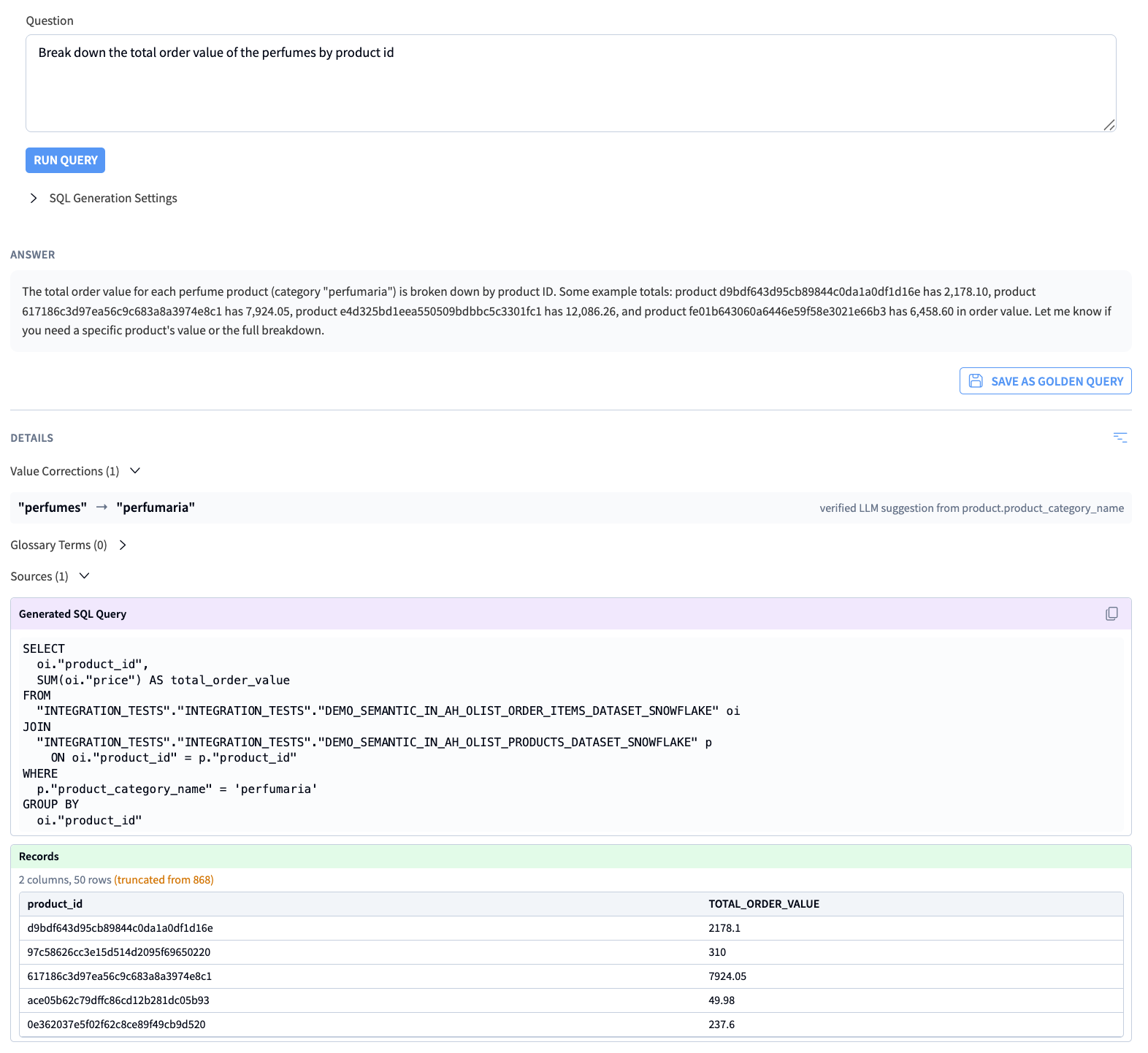
The main value of the Playground is testing out questions you are expecting end-users to ask, and using the output of the tool to refine the semantic model.
Other settings
The Indexing tab is where you configure and run the process that allows Dataiku to perform terms resolution and fetch sample values.
You need to specify an Embedding LLM to select the specific embedding model used for semantic resolution of attributes.
Once your settings are configured, you must manually trigger the indexing process to update the semantic model’s knowledge of your data.
Security and Permissions
Project Access: Users must have Read project content permissions on the project containing the Semantic Model to use it.
Data Security: Semantic Models respect underlying Dataiku dataset permissions. If a user does not have access to the underlying connection or dataset, the Semantic Search tool will fail for that user.
JSON Specification
Here’s an example of a semantic model’s JSON :
{
  "name": "Semantic Model Name",
  "activeVersionId": "v1",
  "versions": [
    {
      "id": "v1",
      "description": "Initial version",
      "created": {
        "on": "2026-05-27T12:00:00Z",
        "by": "user",
      },
      "entities": [
        {
          "name": "orders",
          "description": "Customer orders with revenue and status fields",
          "type": "DATASET",
          "datasetRef": "SALES_ANALYTICS.orders",
          "attributes": [
            {
              "name": "order_status",
              "description": "Current lifecycle status of the order",
              "dssType": "string",
              "type": "COLUMN",
              "column": "status",
              "pseudoSQLExpression": null,
              "distinctValuesHandlingMode": "MANUAL",
              "manualValues": [
                "pending",
                "shipped",
                "cancelled"
              ],
              "indexDistinctValues": true,
              "resolveInUserRequests": true,
              "llmInstructions": "Use for order status questions.",
              "sqlGenerationConfig": {
                "autoValuesLimit": 100
              }
            },
            {
              "name": "order_month",
              "description": "Calendar month of the order date",
              "dssType": "date",
              "type": "EXPRESSION",
              "column": null,
              "pseudoSQLExpression": "DATE_TRUNC('month', order_date)",
              "distinctValuesHandlingMode": "NONE",
              "manualValues": [],
              "indexDistinctValues": false,
              "resolveInUserRequests": false,
              "llmInstructions": null,
              "sqlGenerationConfig": {}
            }
          ],
          "metrics": [
            {
              "name": "total_revenue",
              "description": "Total revenue from all orders",
              "pseudoSQLExpression": "SUM(order_amount)",
              "llmInstructions": "Use when the user asks for sales or revenue totals.",
              "created": {
                "on": "2026-05-27T12:15:00Z",
                "by": "[email protected]",
              }
            }
          ],
          "filters": [
            {
              "name": "completed_orders",
              "description": "Orders that have been shipped to customers",
              "pseudoSQLExpression": "status = 'shipped'",
              "llmInstructions": "Apply for completed or fulfilled orders.",
              "created": {
                "on": "2026-05-27T12:20:00Z",
                "by": "[email protected]",
              }
            }
          ],
          "primaryKey": {
            "attributes": [
              "order_id"
            ]
          },
          "foreignKeys": [
            {
              "referencedEntity": "customers",
              "key": {
                "attributes": [
                  "customer_id"
                ]
              }
            }
          ]
        }
      ],
      "relationships": [
        {
          "firstEntity": "orders",
          "secondEntity": "customers",
          "pseudoSQLExpression": "orders.customer_id = customers.customer_id"
        }
      ],
      "goldenQueries": [
        {
          "name": "monthly_revenue_emea",
          "description": "Monthly EMEA revenue for the last 6 months",
          "question": "What was monthly revenue in EMEA for the last 6 months?",
          "generatedSql": "SELECT DATE_TRUNC('month', order_date) AS month, SUM(order_amount) AS revenue FROM orders WHERE region = 'EMEA' AND order_date >= DATEADD(month, -6, CURRENT_DATE) GROUP BY 1 ORDER BY 1",
          "created": {
            "on": "2026-05-27T12:45:00Z",
            "by": "[email protected]",
          }
        }
      ],
      "crossEntityMetrics": [
        {
          "name": "average_order_value",
          "description": "Average revenue per order",
          "pseudoSQLExpression": "SUM(orders.order_amount) / COUNT(DISTINCT orders.order_id)",
          "llmInstructions": "Prefer when the user asks for AOV or average basket size."
        }
      ],
      "glossaryTerms": [
        {
          "id": "9f5dfb35-2d8c-4f11-b94d-7a6f95d2b302",
          "term": "AOV",
          "description": "Average order value, calculated as total revenue divided by number of orders",
          "source": "MANUAL",
          "userModified": true,
          "created": {
            "on": "2026-05-27T12:50:00Z",
            "by": "[email protected]",
          },
          "synonyms": [
            "average basket size",
            "avg order value"
          ],
          "privateEditorData": {}
        }
      ],
      "glossaryBindings": [
        {
          "termId": "9f5dfb35-2d8c-4f11-b94d-7a6f95d2b302",
          "targetEntityClass": "orders",
          "targetType": "ATTRIBUTE",
          "targetName": "average_order_value",
          "created": {
            "on": "2026-05-28T09:12:00Z",
            "by": "[email protected]",
          }
        }
      ],
      "indexingSettings": {
        "maxDistinctValuesPerAttribute": 500,
        "maxScannedRowsForSQLDatasets": 100000,
        "maxScannedRowsForNonSQLDatasets": 50000
      },
      "privateEditorData": {
        "lastSavedAt": "2026-05-28T09:15:00Z"
      },
      "sqlGenerationConfig": {
        "instructions": "When comparing periods, aggregate by calendar month and use the order_date field unless the user specifies otherwise.",
        "vocabularyTermIds": [
          "9f5dfb35-2d8c-4f11-b94d-7a6f95d2b302"
        ]
      }
    }
  ]
}